Singularity Playground 2 (3D)
Singularity Playground 2 — How to Play
What Is This?
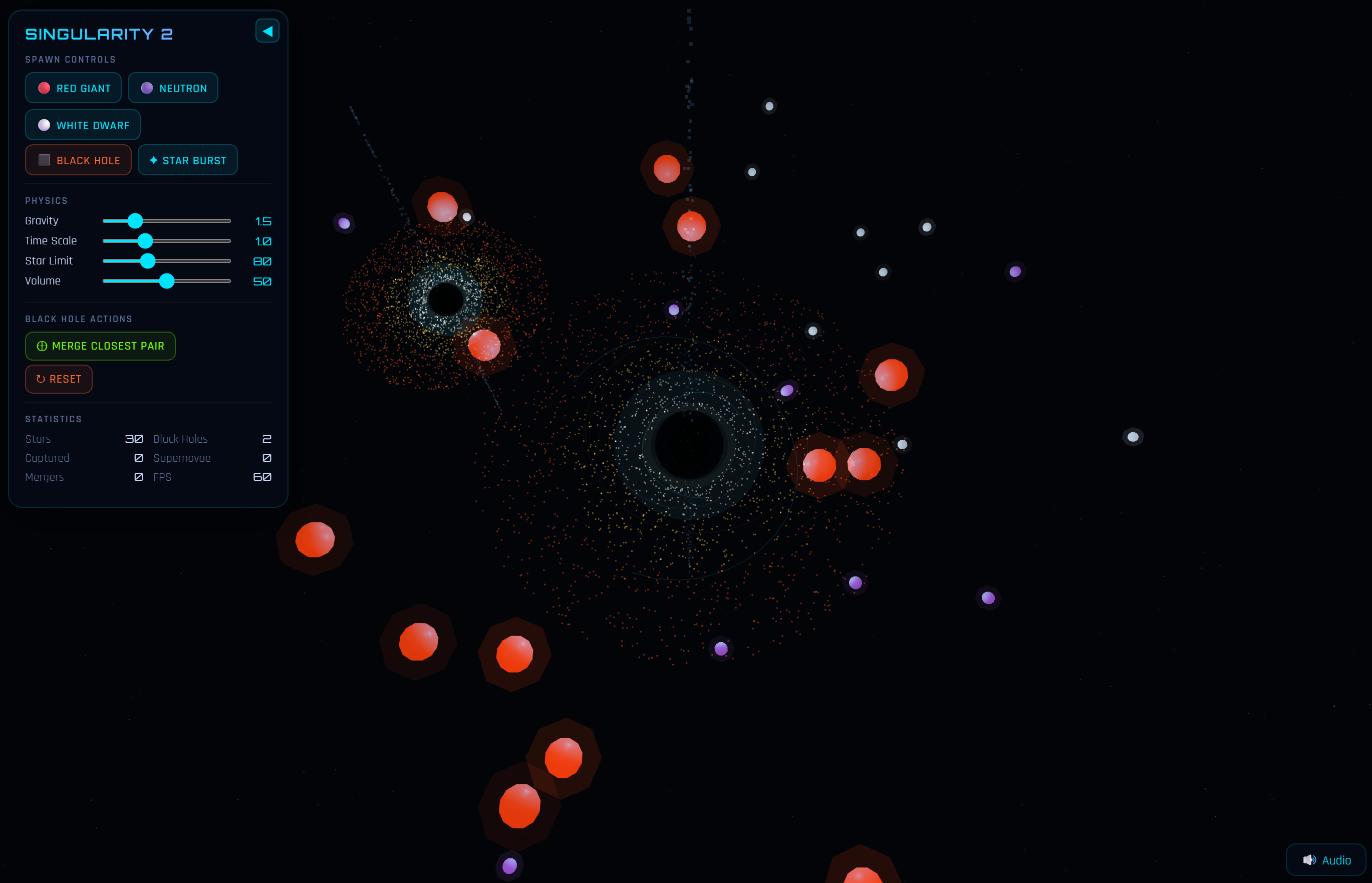
Singularity Playground 2 is a real-time 3D gravitational sandbox. You control a cosmic playground where black holes devour stars, supernovae light up the void, and merging singularities shake the fabric of spacetime. There are no scores, no win conditions — just you and the universe.
Getting Started
Click ▶ LAUNCH SIMULATION (or press Enter) to begin. The simulation starts with one black hole and 30 orbiting stars. From there, it's your sandbox.
Controls
Camera
- Click + Drag — Orbit the camera around the primary black hole
- Scroll Wheel — Zoom in / out
- Touch (mobile) — One finger to orbit, pinch to zoom
HUD Panel (Top Left)
The control panel can be collapsed by clicking the ◀ button. Reopen it with ▶.
Spawning Objects
Use the buttons in the Spawn Controls section:
Star Types
Each star type behaves differently near a black hole.
🔴 Red Giant — Large, bright, and volatile. These massive stars have the highest chance of going supernova when stressed by a black hole's gravity. When a Red Giant goes supernova, there's a 40% chance it leaves behind a Neutron Star remnant. They have shorter lifespans and dramatic deaths.
🟣 Neutron Star — Small but incredibly dense. Neutron stars are the heaviest star type in the simulation, meaning they resist gravitational pull longer before being captured. They have a moderate supernova chance and very long lifespans.
⚪ White Dwarf — Tiny, dim, and stable. White dwarfs are the lightest and longest-lived stars. They rarely go supernova and tend to orbit peacefully for a long time before eventually being captured. Good for building up dense orbital fields.
✦ Star Burst — Spawns 10 random stars at once. Great for quickly populating the simulation or stress-testing a hungry black hole.
Black Holes
⬛ Black Hole — Spawns a new black hole at a random position with random mass. Once two or more black holes exist, they'll gravitationally attract each other and eventually merge on their own.
Black Hole Anatomy
Each black hole is made up of several visible layers:
- Event Horizon — The solid black sphere at the center. Nothing escapes once a star crosses this boundary.
- Dark Halo — A semi-transparent shadow surrounding the event horizon, representing the extreme gravity well.
- Accretion Disk — Thousands of hot particles orbiting the black hole, glowing from white-hot near the center to deep red at the edges.
- Lensing Rings — A blue ring facing the camera (gravitational lensing effect) and an orange ring perpendicular to it, creating the signature cross-halo.
- Energy Tendrils — Animated filaments weaving around the event horizon in alternating blue and orange, representing magnetic field lines and plasma currents.
- Relativistic Jets — Streams of particles shooting from the north and south poles of the black hole at near light speed. These wobble and pulse over time.
- Hawking Radiation — Faint particles slowly escaping from just outside the event horizon, continuously spawning and drifting outward.
- Photon Sphere — A subtle wireframe sphere showing the unstable orbital radius where light itself can orbit the black hole.
Physics Sliders
Gravity (0.5 – 5.0) — Multiplier for all gravitational forces. Crank it up to watch stars spiral in fast, or dial it down for gentle, long-lasting orbits. Default: 1.5.
Time Scale (0.1 – 3.0) — Speed of the simulation. Slow it down to watch individual captures in detail, or speed it up to see the long-term evolution of your system. Default: 1.0.
Star Limit (20 – 200) — Maximum number of stars allowed at once. Higher limits create denser, more chaotic simulations but may impact performance on lower-end devices. Default: 80.
Volume (0 – 100) — Master volume for the procedural audio engine. Default: 50.
Events
Star Capture
When a star gets too close to a black hole's event horizon, it gets pulled in and destroyed. You'll see a burst of cyan particles and hear a descending whoosh sound. The black hole's mass increases slightly with each capture, causing it to slowly grow over time.
Tidal Stretching
As stars approach the event horizon, they visibly elongate toward the black hole — a visualization of spaghettification, the real effect caused by extreme tidal forces.
Supernova
Stars under gravitational stress have a chance of exploding before being captured. Red Giants explode most often and most dramatically. You'll see a massive particle explosion, expanding shockwave rings, and hear a deep boom with crackling energy. The camera shakes on impact. Red Giant supernovae can leave behind Neutron Star remnants.
Black Hole Merger
When two black holes get close enough, they merge automatically. You can also force a merge using the ⊕ Merge Closest Pair button. Mergers produce the simulation's most dramatic event: triple shockwaves (green, cyan, white), a massive particle explosion, heavy camera shake, and a gravitational wave chirp sound that rises in pitch before the impact.
Time Dilation
When stars pass near a black hole, they experience time dilation — their movement slows relative to distant observers. A Time Dilation Factor indicator appears at the bottom center of the screen when dilation is significant. The closer the factor is to 0, the more extreme the effect. The indicator changes color from cyan (mild) to yellow (moderate) to orange (extreme).
Sound Design
The simulation features a fully procedural audio engine — no audio files, everything is generated in real-time.
- Ambient Drone — A deep sub-bass hum from each black hole. Gets louder and pulses faster as you zoom closer. The pitch drops when time dilation is active, creating an eerie slowing effect.
- Supernova Boom — Low-frequency impact with noise crackle and a descending ring tone.
- Capture Whoosh — A quick descending sweep with a short low crunch.
- Merger Chirp — Inspired by real gravitational wave detections: a rising frequency chirp followed by a massive bass impact and noise wash.
- Star Spawn Chimes — Each star type has a unique two-tone chime (lower for Red Giants, higher for White Dwarfs).
- Hawking Whispers — Occasional faint high-frequency wisps when your camera is near a black hole.
Use the 🔊 Audio button (bottom right) or the Volume slider to control sound.
Tips
- Zoom in close to a black hole to experience the full audio and visual effects. Watch the tendrils dance, listen to the drone shift, and see the time dilation indicator respond.
- Spawn two black holes and watch them spiral toward each other. The merger is worth the wait.
- Use Star Burst repeatedly while gravity is cranked up for maximum chaos.
- Slow down time (Time Scale ~0.2) when a star is about to be captured to watch the tidal stretching and spiral in detail.
- Red Giants near black holes create chain reactions — one supernova can leave a neutron star that then gets captured, triggering more effects.
- The simulation is self-sustaining — stars age and die naturally over time even without black hole interaction. Red Giants always go supernova at end of life.
Performance
If the simulation runs slowly, try reducing the Star Limit slider. The most demanding elements are particle effects from supernovae and mergers, which are temporary. The accretion disk (2000 particles per black hole) and relativistic jets are the heaviest persistent effects.
Singularity Playground 2 — A sequel to the original black hole sandbox. Built with Three.js and Web Audio API.
Leave a comment
Log in with itch.io to leave a comment.